|
Getting your Trinity Audio player ready...
|
Overview
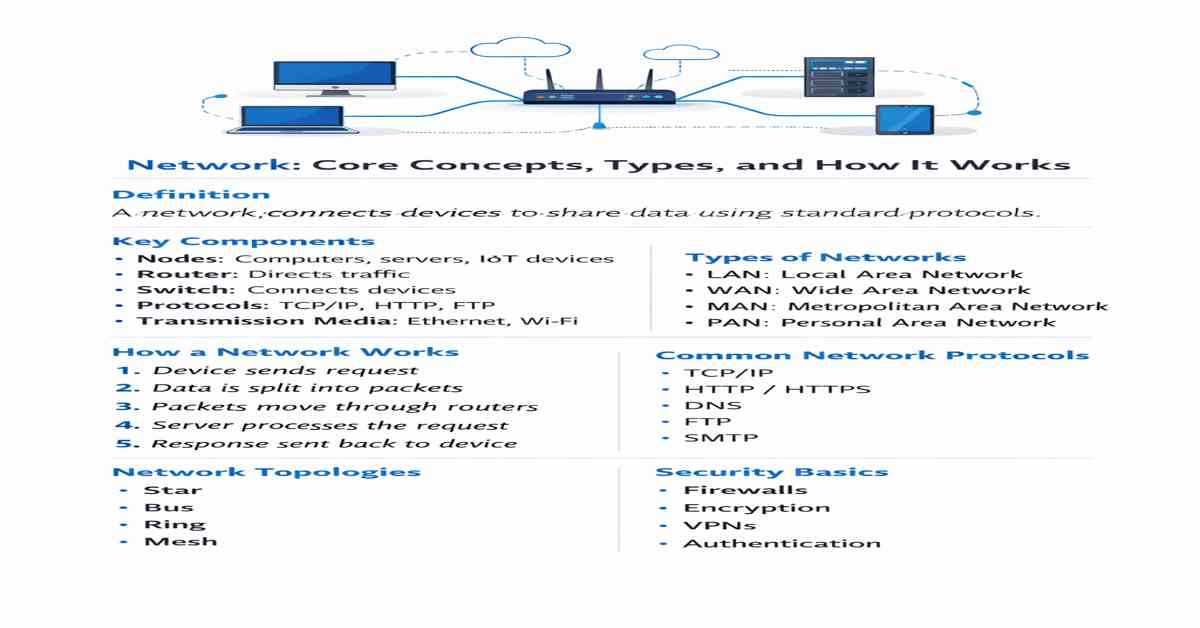
A network is not just connectivity. It is a structured system for data exchange. Every modern application depends on it.

From a simple HTTP request to distributed cloud systems, everything runs on networking layers.
Core Idea
A network moves data from source → destination using defined rules.
It does three things:
- Identifies devices
- Routes data
- Ensures delivery
Without these, communication fails.
Network Architecture
Modern networks follow layered architecture.
OSI Model (Simplified)
- Physical – Signals (cables, radio)
- Data Link – MAC addressing
- Network – IP routing
- Transport – Reliability (TCP/UDP)
- Session – Connection control
- Presentation – Data format
- Application – User interaction (HTTP, DNS)
Real-world systems mostly use TCP/IP model, but OSI helps in debugging.
Key Components (Real Behavior)
Router
- Connects different networks
- Uses routing tables
- Decides best path using metrics (latency, hops)
Switch
- Works inside LAN
- Uses MAC address table
- Faster than router for local traffic
DNS Server
- Converts domain → IP
- Example: google.com → 142.x.x.x
Load Balancer
- Distributes traffic
- Prevents server overload
- Used in scalable systems
How Data Actually Moves
Example: Opening a website
- User enters URL
- DNS resolves domain to IP
- TCP handshake starts (SYN, SYN-ACK, ACK)
- HTTP request is sent
- Server processes request
- Response returned in packets
- Browser renders content
Everything happens in milliseconds.
Packet Structure
Data is not sent as a whole.
It is broken into packets:
- Header (metadata)
- Payload (actual data)
Header contains:
- Source IP
- Destination IP
- Protocol
- Sequence number
Packets may take different paths. Reassembled at destination.
TCP vs UDP
TCP (Reliable)
- Connection-based
- Error checking
- Retransmission
- Slower but safe
Used in:
- Web (HTTP/HTTPS)
UDP (Fast)
- No connection
- No guarantee
- Low latency
Used in:
- Streaming
- Gaming
- VoIP
IP Addressing
Every device has an IP.
Types
- IPv4 → 192.168.1.1
- IPv6 → 2001:db8::1
Public vs Private
- Public → Internet visible
- Private → Internal network
NAT (Network Address Translation) maps private → public.
Network Topologies (Real Use)
Star
- Central switch/router
- Easy to manage
- Most common
Mesh
- Multiple paths
- High reliability
- Used in critical systems
Hybrid
- Combination
- Used in enterprises
Performance Factors

Latency
Time taken for data to travel.
Bandwidth
Maximum data capacity.
Throughput
Actual data transferred.
Packet Loss
Dropped packets reduce performance.
Network Security (Practical)
Firewall
Filters incoming/outgoing traffic.
HTTPS (TLS)
Encrypts communication.
VPN
Creates secure tunnel.
Zero Trust Model
- No device trusted by default
- Continuous verification
Modern Networking Trends
Cloud Networking
- Virtual networks
- Scalable infrastructure
SDN (Software Defined Networking)
- Control via software
- Centralized management
Edge Computing
- Processing near user
- Reduces latency
5G Networks
- Ultra-low latency
- High bandwidth
Real-World Use Cases
- Web applications
- APIs and microservices
- Streaming platforms
- Online gaming
- IoT ecosystems
Why It Matters
No network = no internet.
Every system you build depends on it.
Understanding networking gives you:
- Better debugging
- Faster applications
- Scalable architecture

Arsalan Malik is a passionate Software Engineer and the Founder of Makemychance.com. A proud CDAC-qualified developer, Arsalan specializes in full-stack web development, with expertise in technologies like Node.js, PHP, WordPress, React, and modern CSS frameworks.
He actively shares his knowledge and insights with the developer community on platforms like Dev.to and engages with professionals worldwide through LinkedIn.
Arsalan believes in building real-world projects that not only solve problems but also educate and empower users. His mission is to make technology simple, accessible, and impactful for everyone.
Join us on dev community