|
Getting your Trinity Audio player ready... |
Why does JavaScript feel so fast in Chrome and Node.js? The answer lies in V8 — a powerful JavaScript engine that changed how the modern web works.
If you’re a web developer who uses JavaScript daily, understanding Chrome’s V8 JavaScript Engine is no longer optional. It helps you write faster code, debug performance issues, and understand why some patterns are slow while others are blazing fast.
In this guide, I’ll explain V8 in a practical, developer‑friendly way — not just theory, but how it actually works today.

What Is Chrome’s V8 JavaScript Engine?
V8 is Google’s open‑source high‑performance JavaScript and WebAssembly engine, written in C++. It is used in:
- Google Chrome
- Node.js
- Deno
- Electron
- Many modern JavaScript runtimes
V8’s main job is simple:
Convert JavaScript into highly optimized machine code and execute it as fast as possible.
Unlike older engines that interpreted JavaScript line by line, V8 uses a multi‑stage compilation pipeline that continuously optimizes your code while it runs.
Official Source: https://v8.dev
Why V8 Is So Fast (At a High Level)
V8 achieves speed through:
- Just‑In‑Time (JIT) compilation
- Bytecode interpretation
- Speculative optimization
- Fast garbage collection
- Hidden classes & inline caching
But the real magic lies in how these pieces work together.
Modern V8 Architecture (Important)
Many articles still mention Crankshaft or Full‑Codegen. These are deprecated.
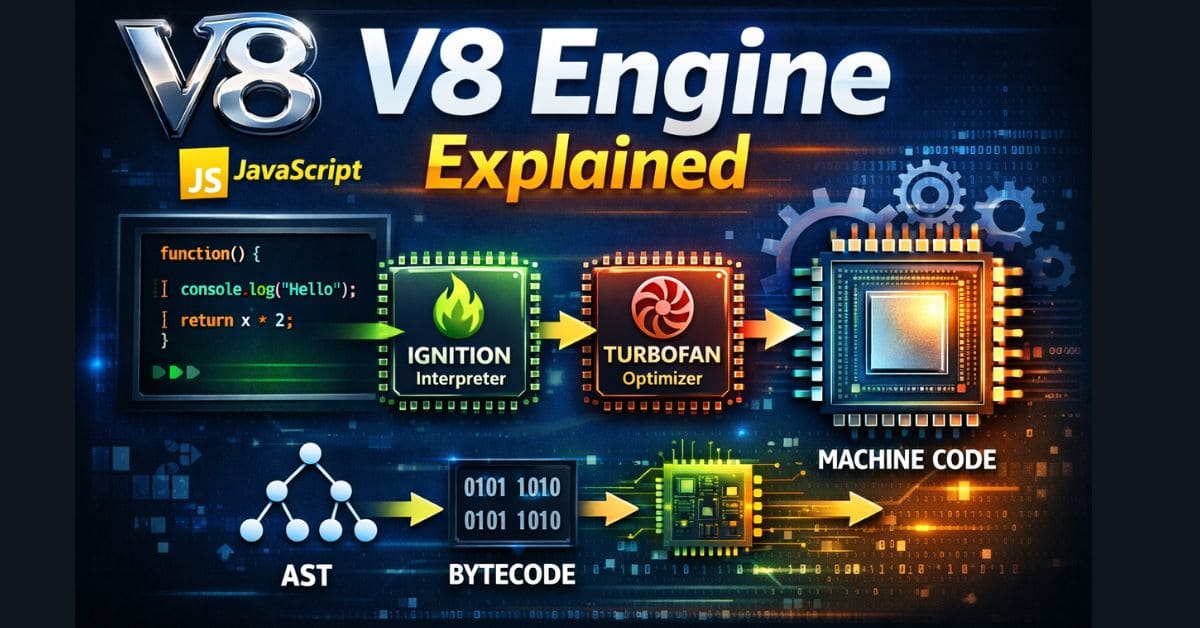
Today’s V8 pipeline looks like this:
- Parser – Converts JavaScript into an Abstract Syntax Tree (AST)
- Ignition – Interprets JavaScript as bytecode
- Sparkplug – Fast non‑optimizing compiler (baseline)
- Maglev – Mid‑tier optimizing compiler
- TurboFan – High‑performance optimizing compiler
Reference: https://v8.dev/docs
Step‑by‑Step: How V8 Executes JavaScript
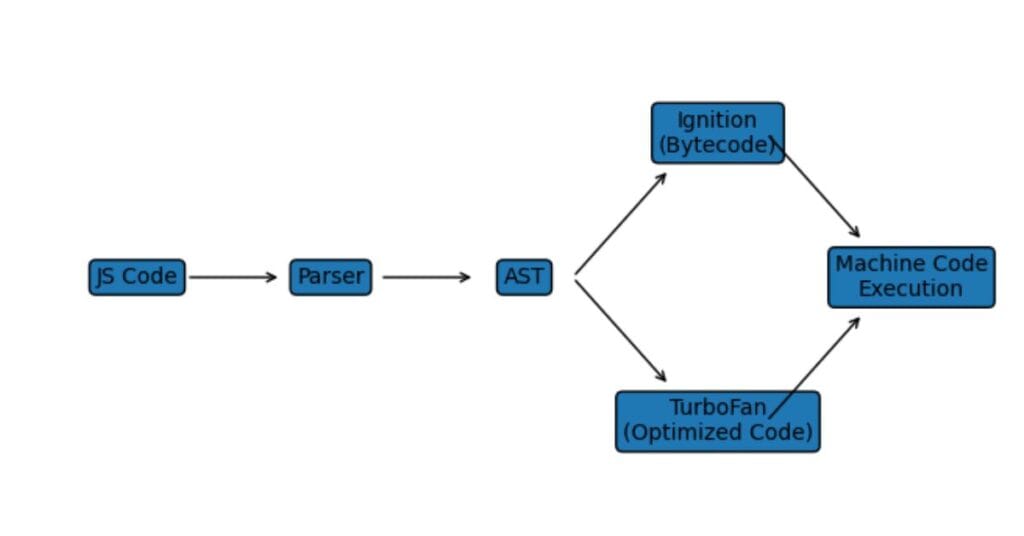
The image shows how JavaScript code flows through different stages inside the V8 engine: starting from JavaScript source code, moving through the Parser and Abstract Syntax Tree (AST), then being executed via the Ignition bytecode interpreter. Frequently used (“hot”) code paths are further optimized by TurboFan, which generates optimized machine code for faster execution. This visual explains how V8 uses both interpretation and Just-In-Time (JIT) compilation to achieve high performance.
1️⃣ Parsing Phase
V8 parses your JavaScript into an AST (Abstract Syntax Tree). Syntax errors are detected here.
2️⃣ Ignition: Bytecode Interpreter
Instead of compiling directly to machine code, V8 first generates bytecode using Ignition.
Why?
- Faster startup time
- Lower memory usage
- Quick execution for small scripts
3️⃣ Profiling While Running
As your code runs, V8 continuously collects data:
- Which functions are called frequently
- What data types are used
- Which branches execute most
This allows speculative optimization.
4️⃣ TurboFan Optimization
Hot code paths are sent to TurboFan, which:
- Generates optimized machine code
- Assumes consistent data types
- Applies aggressive performance tricks
If assumptions break, V8 deoptimizes and safely falls back.
Deep dive: https://web.dev/speed-v8/
Hidden Classes: The Secret Sauce of V8
JavaScript objects are dynamic by design, but V8 optimizes them by internally using hidden classes, making objects behave like static structures for better performance.
Example: Consistent Object Creation
const user = { name: 'Arsalan', age: 25 };
When multiple objects are created with the same properties in the same order, V8 can reuse the same hidden class, which results in faster property access and better performance.
❌ Bad Pattern (Different Property Insertion Order)
const a = {};
a.x = 1;
a.y = 2;

const b = {};
b.y = 2;
b.x = 1;
Why this is bad ❌
- Objects contain the same properties
- Properties are added in different orders
- V8 creates different hidden classes
- Inline caching is broken
- Property access becomes slower
⚠️ This code is valid JavaScript, but it is a performance anti-pattern in V8.
✅ Good Pattern (Consistent Object Shape)
function User(name, age) {
  this.name = name;
  this.age = age;
}
Why this is good ✅
- Properties are added in the same order for every instance
- V8 reuses a single hidden class
- Faster property access
- Better memory optimization
Example usage:
const u1 = new User('Arsalan', 25);
const u2 = new User('Ali', 30);
Both objects share the same hidden class, which improves performance.
Source
V8 Official Blog:
https://v8.dev/blog/fast-properties
Inline Caching (IC)
Inline caching allows V8 to remember how a function behaved before and reuse optimized paths.
This drastically reduces:
- Property lookup cost
- Function call overhead
Garbage Collection in V8
V8 uses a generational garbage collector:
| Memory Type | Purpose |
|---|---|
| Young Generation | Short‑lived objects |
| Old Generation | Long‑lived objects |
Key GC Techniques
- Scavenge GC (young objects)
- Mark‑Sweep & Mark‑Compact
- Incremental & concurrent GC
Reference: https://v8.dev/blog/trash-talk
V8 vs Other JavaScript Engines (Comparison)
| Engine | Browser / Runtime | Performance Focus |
|---|---|---|
| V8 | Chrome, Node.js | Raw speed & optimization |
| SpiderMonkey | Firefox | Memory efficiency |
| JavaScriptCore | Safari | Power & mobile efficiency |
V8 dominates server‑side JavaScript thanks to Node.js.
Why V8 Matters for Web Developers
Understanding V8 helps you:
- Write performance‑optimized JavaScript
- Avoid unnecessary deoptimizations
- Improve Node.js backend performance
- Debug memory leaks
This knowledge directly impacts real‑world projects.
Common Myths About V8
❌ JavaScript is slow
✅ Modern engines like V8 rival native languages in many workloads
❌ JIT always improves performance
✅ Bad patterns can cause deoptimization
FAQs About Chrome’s V8 JavaScript Engine
❓ Is V8 only used in Chrome?
No. V8 is also used in Node.js, Deno, Electron, and many tools.
❓ Does V8 compile JavaScript or interpret it?
Both. It starts with interpretation and progressively compiles hot code.
❓ Can developers control V8 optimization?
Not directly, but writing predictable code patterns helps V8 optimize better.
❓ Is V8 faster than other engines?
In many benchmarks, yes — especially for server‑side JavaScript.
Final Thoughts
Chrome’s V8 JavaScript Engine is not just a browser component — it is the foundation of modern JavaScript performance.
If you want to level up as a JavaScript developer, understanding how V8 works internally gives you a huge advantage.

Arsalan Malik is a passionate Software Engineer and the Founder of Makemychance.com. A proud CDAC-qualified developer, Arsalan specializes in full-stack web development, with expertise in technologies like Node.js, PHP, WordPress, React, and modern CSS frameworks.
He actively shares his knowledge and insights with the developer community on platforms like Dev.to and engages with professionals worldwide through LinkedIn.
Arsalan believes in building real-world projects that not only solve problems but also educate and empower users. His mission is to make technology simple, accessible, and impactful for everyone.
Join us on dev community