|
Getting your Trinity Audio player ready... |
This article explains a real production issue where the www version of a website stopped working, while the non-www version loaded correctly. The problem was caused by an SSL conflict between Cloudflare and Hostinger and was resolved by bypassing Cloudflare for the affected hostname.
The Problem
The website showed inconsistent behavior:
https://example.comworkedhttps://www.example.comfailed
DNS records were correct.
The issue appeared only after enabling Cloudflare.
Browsers showed SSL or connection errors for the www version.
How SSL Works with Cloudflare
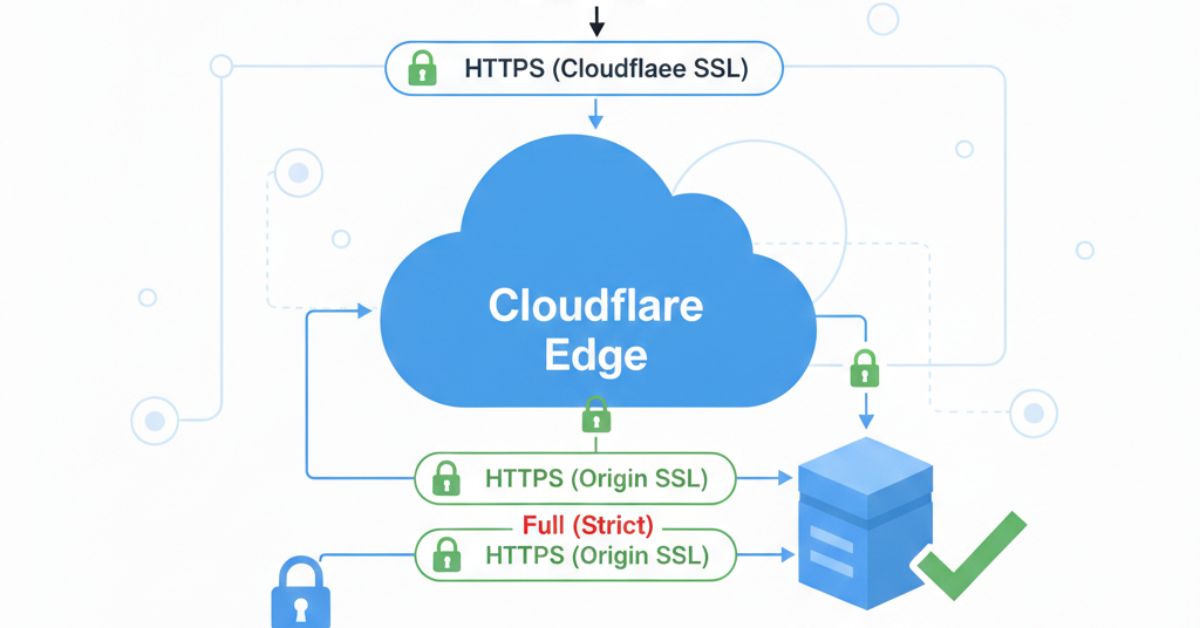
When Cloudflare proxy is enabled, HTTPS runs in two SSL layers:
- Visitor → Cloudflare
- Cloudflare → Origin server (Hostinger)
Both layers must validate the same hostname.
SSL Flow with Cloudflare Proxy (Failing Case)

If the origin SSL does not fully support www, Cloudflare cannot complete the handshake.
Root Cause
The root cause was an origin-level SSL mismatch:
- Cloudflare was proxying
www - Hostinger SSL was valid for the root domain
wwwhostname was not properly covered- TLS handshake failed between Cloudflare and Hostinger
This failure occurred before any HTTP logic was reached.
Why Redirects Did Not Work
Redirects execute after HTTPS is established.
In this case:
- TLS negotiation failed first
- The request never reached the server
- Redirect rules were never triggered
That is why www → non-www redirects did not help.
The Actual Fix
The solution was to remove Cloudflare from the SSL path for the affected hostname.
SSL Flow After Bypassing Cloudflare (Fixed Case)

Steps Applied
- The
www(or affected subdomain) record was set to DNS Only (Grey Cloud) - Cloudflare stopped proxying traffic
- Requests went directly to Hostinger
- Hostinger handled SSL termination
No redirects.
No Cloudflare rules.
No SSL mode changes.
Result
wwwversion started working immediately- SSL errors disappeared
- HTTPS became stable
The fix took effect as soon as Cloudflare was bypassed.
Why This Fix Works
By disabling Cloudflare proxying:
- Only one SSL layer remains
- No hostname negotiation between CDN and origin
- No certificate mismatch
Diagram: Comparison Summary
With Cloudflare Proxy        DNS Only (Bypass CDN)
---------------------        ----------------------
Two SSL layers               Single SSL layer
CDN + Origin SSL             Origin SSL only
Hostname mismatch risk       No mismatch
Complex TLS flow             Simple HTTPS flow
This approach works when the hosting provider controls SSL and limits certificate management.
When This Approach Makes Sense
Use DNS Only mode if:
wwwfails only when Cloudflare proxy is enabled- Origin SSL is auto-managed
- Certificate regeneration is not possible
When You Should Not Use This
Avoid this approach if:
- You rely on Cloudflare CDN caching
- You use Cloudflare WAF or security rules
- Your origin SSL fully supports all hostnames
In those cases, fixing the origin SSL is the correct solution.
Best Practice Recommendation
For production environments:
- Ensure origin SSL covers root + www
- Use Full (Strict) mode in Cloudflare
- Proxy traffic only after confirming hostname coverage

Arsalan Malik is a passionate Software Engineer and the Founder of Makemychance.com. A proud CDAC-qualified developer, Arsalan specializes in full-stack web development, with expertise in technologies like Node.js, PHP, WordPress, React, and modern CSS frameworks.
He actively shares his knowledge and insights with the developer community on platforms like Dev.to and engages with professionals worldwide through LinkedIn.
Arsalan believes in building real-world projects that not only solve problems but also educate and empower users. His mission is to make technology simple, accessible, and impactful for everyone.
Join us on dev community